


The mechanism, not the prompt
01Every prompt sheet is followed by why it works. Name a mechanism and it gets copied; name an appearance and it gets averaged.
✕make it feel premium
✓letter-spacing: −0.03em
Design, generate and ship animated, 3D and shader-driven websites with AI.
I have bought most of the prompt packs. They are all the same object: a list of prompts, sorted by category, screenshotted so you retype them by hand, written against one version of one model.
They are worth very little by the time the next model ships, because not one of them ever said why anything worked. That is the whole problem. An adjective handed to a model gets decoded toward the average of everything it has read; a measurement, a hex value or a physical model gets copied.
Every prompt in this book is followed by which of those it is doing. So when the tool underneath changes — and it will, probably within the year — you still know what you were asking for.
It is not a pack. It is one pipeline, carried end to end: a board of pins becomes a brief, a brief becomes plates and clips, a plate and a layout become a page, a page becomes a site, and a site becomes a post, a client, and something in a library that starts the next one further along.
Everything in it was built the way it is described — the sites, the clips, the shaders, the 3D scenes. Where something took three attempts, you get three attempts. Where the model got it wrong, you get the wrong version too, because the recovery is the part worth learning.
One honest warning: none of this makes taste optional. AI collapses the cost of production, which means the only thing left to compete on is judgement — what to reference, what to remove, when a scene is worth its weight.
It is the complete method behind animated, 3D and shader-driven sites — mechanism first, tools second.
For people who ship
Advanced motion, 3D and shader work you will not find written down anywhere else at this length.
Parts 03–05
For people starting
The whole pipeline in order, with a named free path for every paid tool in it.
Parts 01–02
For teams
A manual you can hand to somebody new, so the standard survives the handover.
Parts 06–07
A prompt list
Prompt to Motion
From landing the client to the shader, in the order the work actually happens.
Every prompt sheet is followed by why it works. Name a mechanism and it gets copied; name an appearance and it gets averaged.
Real selectable text in the PDF, not screenshots. No smart quotes and no em dashes, so every one pastes straight into a terminal.
The never-list
Never add: gradient text, glass cards, floating 3D blobs, purple-to-blue. Ground is one value. Accent is one value, used three times or fewer. Every measurement in this file is a value, not an adjective.
Six of thirty-six
The same site runs through Parts 02 to 04 — board of pins to deployed URL. Follow it and you finish with a portfolio piece, not seven half-sites.
The real failure and the fix, including ours. Where something took three attempts, you get three attempts.
The failure
The loop cuts on the seam, every six seconds.
The fix
Match the end frame to the start frame, then re-encode.
Seven chapters on scroll-driven scenes, procedural geometry, fragment shaders, and the spectral integral behind glass and chrome.
One page carries every model name. When a model is replaced, that page is reissued and anything depending on its behaviour is re-tested.
Chapter 03 sets this out and every chapter after it runs inside one of these stages.
The right-hand line is the decision each stage exists to make. If you remember nothing else from the book, remember that column.
You make
Three boards, four-word tags
It decides
What this is going to feel like
You make
brief.md, six blocks
It decides
Ground, accent, type and sections — as values
You make
Comp, plate, layout, clip
It decides
Where the empty third goes
You make
A page, then a language, then a site
It decides
What to withhold from the first prompt
You make
Reveal, mask, blend, pin
It decides
Which three moments move
You make
Geometry, architecture, shaders
It decides
Whether the scene should exist at all
You make
Budgets, eleven checks, a handover
It decides
What a stranger on a slow phone gets
Each part ends with something you can ship — a brief, an asset, a section, a scene, a site.
A clear line between the work that is now free and the work that still carries a price.
3 chaptersThe gap between a template and a site that moves
The four tells, and the prompt lines that kill them
Reference → plate → motion → build → polish → ship
A brief every later chapter builds from, written as values rather than adjectives.
4 chaptersThe twenty-minute reference sprint
Turning pins into vocabulary
Writing the file every chapter builds on
Where the line actually sits
A family of stills and a hero loop that closes, under budget.
5 chaptersSubject, lens, light, material, negative space
The split that changes everything
Fifteen assets that look like one set
One move per clip, and loops that hold
Encoding, posters, and our own five-times-over case study
A nine-page site in one design language, with the motion layer on it.
7 chaptersFirst draft speed against twentieth-edit control
What to specify and what to withhold
Move a design language without moving the content
The editing vocabulary that lands
Scroll, mask, blend, pin
One bug, three fixes, and how to debug AI motion
Pages five through nine, and the template teardown
A scroll-driven scene, a fragment shader you wrote, and four builds to read.
7 chaptersWhen a scene beats a video, and when it doesn't
Generated model or procedural geometry
The skeleton behind every 3D build here
UVs, time, noise, and the debugging ladder
The spectral integral and four bugs that make it grey
Point clouds across five sections
Aperture, Meridian, the ring, the globe
A live URL that passes the eleven checks on a slow phone.
2 chaptersBudgets, reduced motion, and the launch checklist
Repo to live URL to client
A clip, a proposal, and something left behind when the project ends.
3 chaptersPost the work, not opinions about the work
Proposals, qualifying, and a pricing ladder
Why a library compounds and client work doesn't
Plus the back matter: every prompt in the book indexed by page, a glossary, and the resource list.
Prompt sheets, the plate-and-layout split, shader source, and both 3D case studies. Open any one to read it.
Seven chapters on scroll-driven scenes, procedural geometry, fragment shaders and particle morphs — starting from UVs and a debugging ladder, not from a library you paste in and hope.
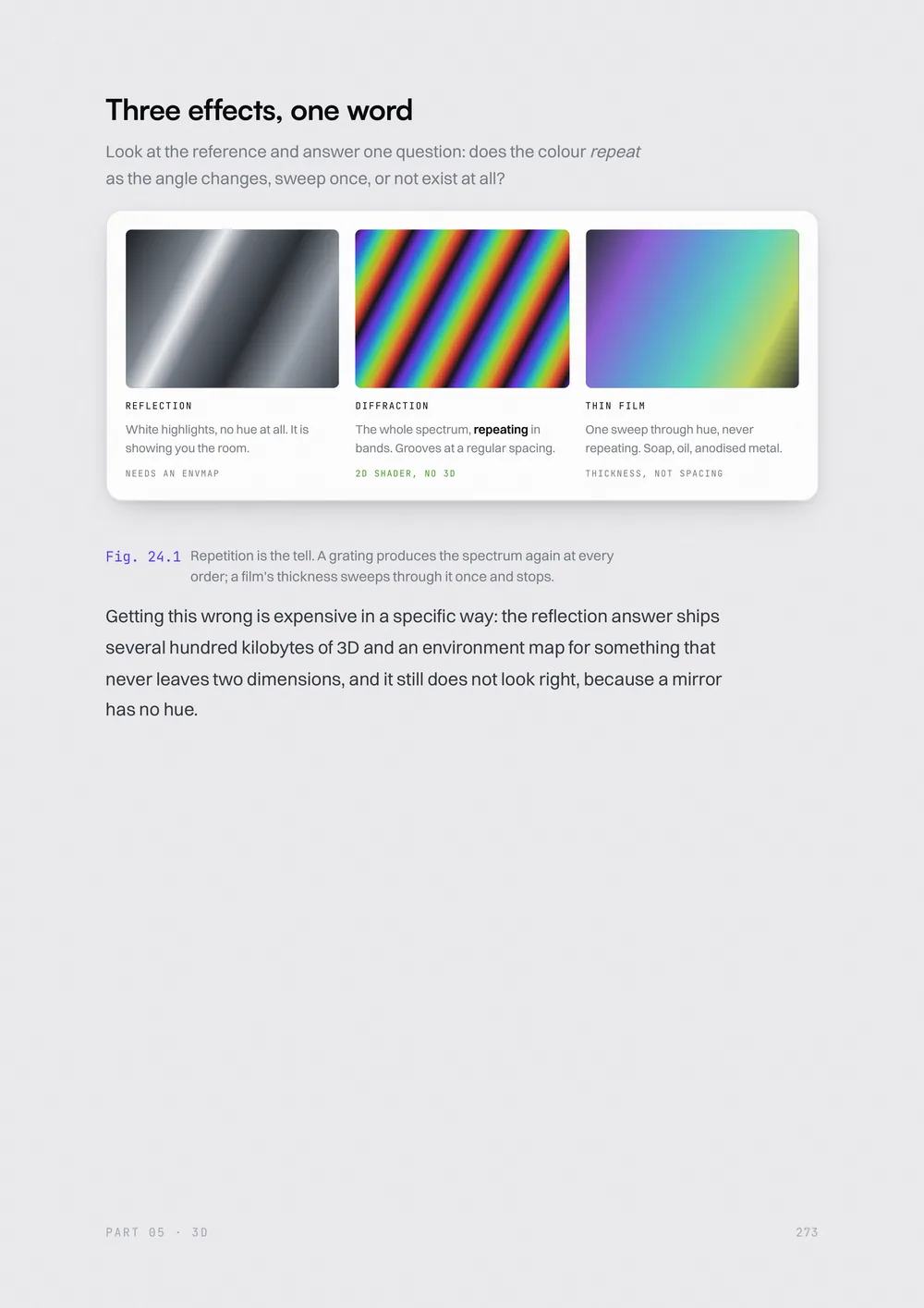
White highlights, no hue at all. It is showing you the room.
The whole spectrum, repeating in bands. Grooves at a regular spacing.
One sweep through hue, never repeating. Soap, oil, anodised metal.
Getting this wrong is expensive in a specific way: the reflection answer ships several hundred kilobytes of 3D for something that never leaves two dimensions — and it still looks wrong, because a mirror has no hue.
3D without the maths
When a scene beats a video, and when it doesn't
Two roads to an object
Generated model or procedural geometry
The scroll-driven 3D architecture
The skeleton behind every 3D build here
Your first fragment shader
UVs, time, noise, and the debugging ladder
Glass, chrome and diffraction
The spectral integral and four bugs that make it grey
Particles that morph
Point clouds across five sections
Case studies
Aperture, Meridian, the ring, the globe
Edition 01 · 374 pages · PDF
You’ll sign in first, so the book has an account to land in.
Delivered as a download link by email once payment settles. See the refund policy before you buy — it is a digital file, so the terms are specific.
Works with what you already use
Every job in the book names a free option too.
What matters is the role, not the brand — swap any of them and the pipeline is unaffected. That is why the method outlives the tools it was written against.
| Job | Free option named |
|---|---|
| Plates & layouts | GPT Image, free tier |
| Second opinion | same |
| Loops & transitions | free credits |
| Motion transfer | Kling 3.0 |
| Structure & 3D | Gemini 3.7 |
| Small edits | Grok 4.6 |
Everything up to Part 05 runs anywhere a browser does. The 3D and shader chapters want a discrete GPU or a recent laptop chip.
Including the reasons this might not be the right book for you.
Still stuck?
Ask before you buy rather than after. A person replies.
No, but you need to be willing to read it. The builds run through an AI coding agent, so you are directing and correcting rather than typing implementations. Part 05 goes into shader source properly — you will be reading GLSL by the end of it, which is the point.
The toolkit is on one page, and it is the only page carrying version numbers. When a model is replaced, that page is reissued and anything that depended on its specific behaviour is re-tested. Claims that were true in a given month say so in the text. Everything else is mechanism, which outlives the tools — buying Edition 01 gets you every version after it.
Roughly $60–100 a month at the tier the book assumes, as of August 2026. A free or cheaper path is named for every paid tool in the toolkit table, and the pipeline is unaffected by which one you pick — what matters is the role, not the brand.
The library is finished builds, each shipping the prompts that made it. The book is the method that produces them. They work well together and neither needs the other: if you only want a site, start with a template; if you want to be able to make them, start here.
Everything up to Part 05 runs anywhere a browser does. The 3D and shader chapters want a discrete GPU or a recent laptop chip, because you will be running scenes rather than looking at pictures of them.
A PDF, emailed to you as a download link once payment settles. Every prompt in it is real text, so you can select and copy straight out of the page rather than retyping from a screenshot.
The pipeline, the mechanisms underneath it, and four builds’ worth of the mistakes. The only thing left is a first project, and it does not have to be for anybody.
You’ll sign in first, so the book has an account to land in.
Included — next version
Start from something finished
Builds that ship with the prompts that made them, a language spec and a never-list — the method in this book, already applied.
Browse the library→